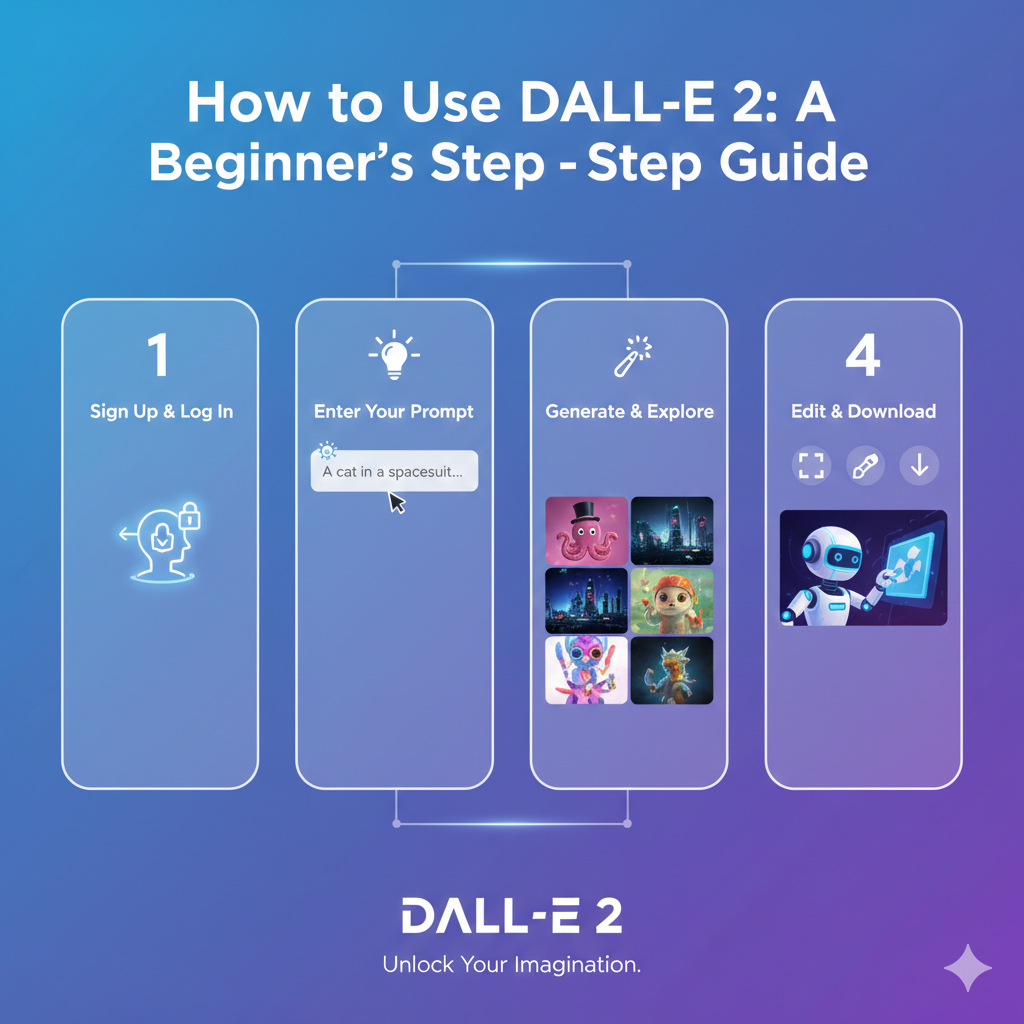
DALL·E 2 is an advanced AI system developed by OpenAI that turns simple text descriptions into realistic or artistic images within seconds.
In simple terms, you type what you want to see—such as “a futuristic city floating above the clouds at sunset” — and the system generates original visuals based on your words.
Unlike traditional design software that requires manual skills, DALL·E 2 uses deep learning models trained on millions of image-text pairs to understand objects, styles, lighting, and composition.
If you’re exploring How to Use Dall-e 2, the process feels surprisingly intuitive. You enter a prompt, select your preferred variation, and download the result.
It can also edit parts of an image (a feature called inpainting) or create multiple variations of the same concept.
This makes it useful not only for artists but also for marketers, bloggers, educators, and entrepreneurs.
AI image generation is trending because it dramatically reduces time and cost. According to industry reports, businesses spend thousands of dollars annually on custom visual content.
With tools like DALL·E 2, high-quality images can be generated in seconds instead of days.
The global generative AI market is projected to grow rapidly in the coming years, reflecting how quickly companies are adopting these tools.
Another reason interest in How to Use Dall-e 2 is growing is accessibility.
You no longer need advanced graphic design skills to create professional-looking visuals.
For example, a small business owner can generate social media graphics without hiring a designer, and a teacher can create custom illustrations for lessons instantly.
The rise of platforms like ChatGPT has also increased awareness of AI-powered creativity.
As people become more comfortable interacting with AI through text, experimenting with AI-generated images feels like a natural next step.
In short, learning How to Use Dall-e 2 isn’t just about creating images—it’s about understanding a shift in how digital content is produced.
AI image generation is trending because it empowers everyday users to turn imagination into visuals faster than ever before.
More Read: What is Adobe Firefly and Why It Matters in 2026
Getting Started
Getting started with DALL·E 2 is surprisingly simple, even if you’ve never used an AI tool before. If you’re learning How to Use Dall-e 2, the first step is creating an account.
You can sign up using your email address or a Google account. The process takes only a few minutes, and once verified, you’ll gain access to the image generation interface.
This quick onboarding is one reason AI tools have seen massive adoption—millions of users worldwide now experiment with generative AI platforms daily.
After signing in, you’ll land on the dashboard. This is where understanding How to Use Dall-e 2 becomes practical.
The interface typically includes a prompt box at the top where you type your description, a gallery of previously generated images, and options for editing or creating variations.
The design is intentionally minimal so users can focus on creativity rather than technical settings.
For example, you might type, “modern minimalist living room with natural light and indoor plants,” and within seconds, multiple visual options appear.
You can click on any image to download, edit, or expand it further.
One important part of mastering How to Use Dall-e 2 is understanding credits and usage limits.
Image generation systems often operate on a credit-based model, meaning each image request consumes a certain number of credits.
Depending on your subscription plan, you may receive a fixed monthly limit.
This system helps manage computing resources, as generating high-quality AI images requires significant processing power.
For context, large AI models can use billions of parameters to interpret prompts and create visuals, which explains why usage limits exist.
Being aware of your credits encourages thoughtful prompting.
Instead of submitting vague ideas, users who understand limits tend to craft clearer, more detailed descriptions—leading to better results and fewer wasted generations.
Once you’re comfortable navigating the dashboard and managing credits, you’re well on your way to confidently exploring everything this AI tool can offer.
Also Read: Can I Delete Older Luminar Neo Backups? Complete Guide for Safe Cleanup
Generating Your First Image
When learning How to Use Dall-e 2, the most exciting moment is writing your first prompt. This is where your creativity meets AI.
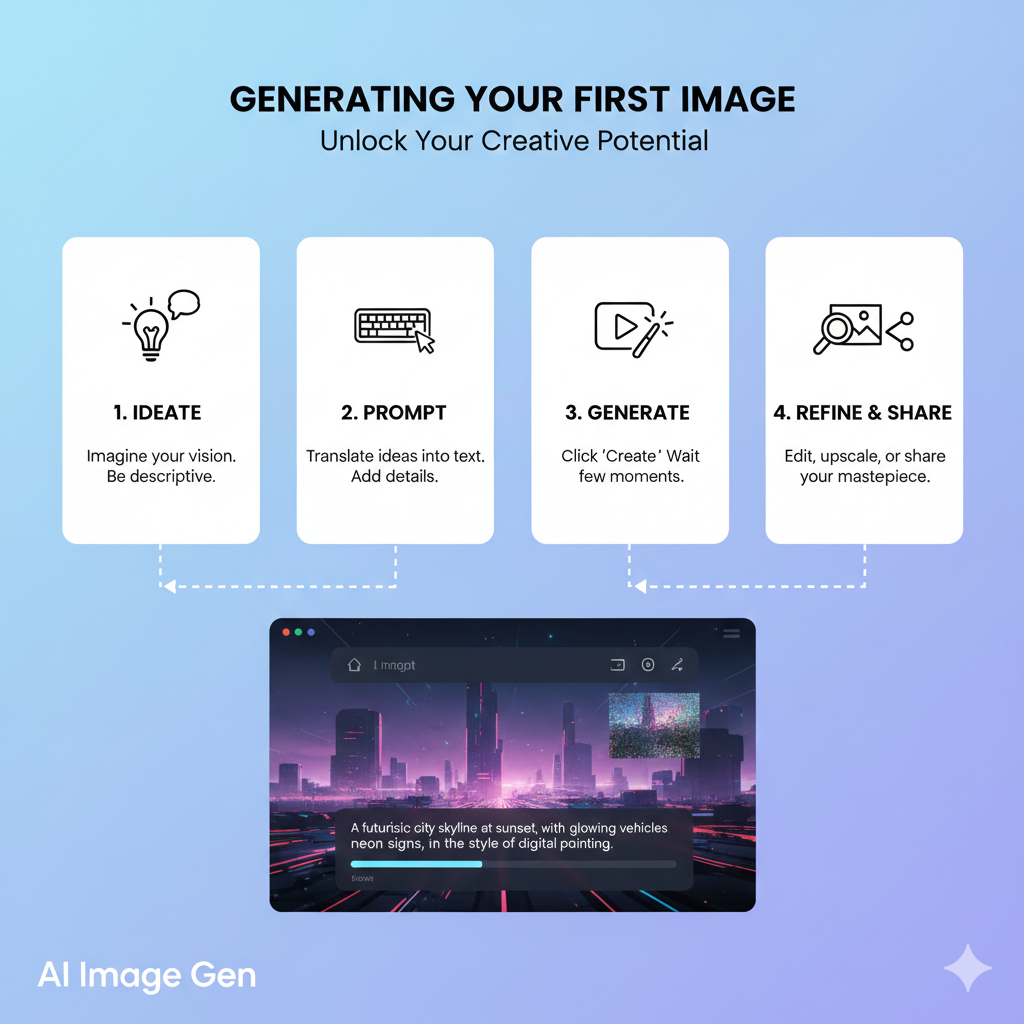
A prompt is simply a text description of the image you want to generate. The key is clarity.
Instead of typing “a dog,” try something more specific like, “a golden retriever puppy playing in a sunny park, cinematic lighting, shallow depth of field.”
The more details you provide about subject, setting, mood, and perspective, the better the output. Since DALL·E 2 was trained on millions of image-text pairs, it understands descriptive language surprisingly well.
Understanding How to Use Dall-e 2 also means experimenting with styles and formats.
You can guide the AI to create images that look like oil paintings, 3D renders, watercolor art, digital illustrations, or even photorealistic photography.
For example, adding phrases like “in the style of a magazine cover” or “ultra-realistic product photography” dramatically changes the result.
If you’re designing for social media, you might specify “square format” or “high-resolution banner layout.” These small adjustments help tailor images for platforms like Instagram, blogs, or presentations.
Studies show that visual content increases engagement by over 40% compared to text-only posts, which explains why so many creators are learning How to Use Dall-e 2 for content production.
Instead of waiting days for custom graphics, you can generate multiple design options in minutes.
Once you’re satisfied with the result, downloading your image is straightforward.
Simply select your preferred version and save it to your device. Many users generate several variations before choosing the best one.
This iterative process—prompt, refine, adjust—helps you quickly improve your results.
With just a thoughtful prompt and a few style tweaks, you can turn a simple idea into a professional-quality visual ready to share or publish.
More Read: Which AI Is Best for Roasting? A Complete Guide to Savage AI Humor
Improving Your Results
One of the biggest breakthroughs when learning How to Use Dall-e 2 is realizing that details make all the difference.
A short prompt might give you a basic image, but adding layered descriptions transforms it into something striking.

For example, instead of writing “coffee shop interior,” try: “cozy Scandinavian-style coffee shop, wooden furniture, warm natural light, customers working on laptops, shot with a 35mm lens.”
Notice how subject, setting, atmosphere, and even camera details work together.
Because DALL·E 2 interprets language contextually, richer descriptions often produce more accurate and visually compelling results.
Using artistic styles is another powerful technique. When exploring How to Use Dall-e 2, think beyond just objects—consider how you want the image to feel visually.
You can reference styles like watercolor painting, digital illustration, cinematic photography, or 3D render.
For example, “portrait of a medieval queen, oil painting, dramatic brush strokes” creates a completely different outcome than “portrait of a medieval queen, hyper-realistic photography, 8K resolution.”
According to marketing research, visually distinct creative styles can increase audience recall by up to 65%, which is why many brands experiment with multiple aesthetics before choosing one.
Lighting and mood are subtle but game-changing adjustments.
Adding phrases like “golden hour lighting,” “soft diffused morning light,” “moody shadows,” or “neon cyberpunk glow” shifts the emotional tone of the image instantly.
In photography, lighting determines depth, realism, and emotional impact—and the same principle applies here.
If you’re designing an ad for a luxury product, “low-key lighting with dramatic contrast” might communicate sophistication.
For a wellness brand, “bright, airy lighting with pastel tones” feels more inviting.
Mastering these small refinements is essential to understanding How to Use Dall-e 2 effectively.
The process becomes less about typing random ideas and more about directing a creative assistant.
With practice, you’ll notice that precise details, intentional style choices, and thoughtful lighting cues consistently lead to professional-quality visuals.
More Read: Is Medisearch Free? A Complete Guide for Users
Editing and Variations
Once you understand the basics of How to Use Dall-e 2, the real creative power comes from refining your results.
One of the most useful features is creating alternate versions. Instead of starting from scratch, you can generate variations of an image you already like.
For example, if you created “a modern home office with natural lighting,” you can ask for multiple versions with different layouts, color tones, or décor styles.
This is incredibly helpful for marketers and designers who want options before finalizing a visual.
Studies show that testing multiple creative variations can improve campaign performance by up to 30%, which explains why iteration matters.
Another key skill in mastering How to Use Dall-e 2 is editing specific areas of an image.
With tools like inpainting, you can select a portion of the image and modify only that section.
Imagine you generated a product mockup but want to change the background from white to a beach setting—you don’t need to recreate the entire image.
You simply highlight the area and describe the change. DALL·E 2 intelligently blends the new content with the existing design, saving time and creative effort.
This feature is especially valuable for businesses adjusting branding elements or fixing small visual issues.
However, there are common mistakes to avoid. First, using vague prompts like “make it better” or “cool design” often leads to unpredictable results.
The AI performs best with clear, descriptive instructions. Second, overloading a prompt with too many unrelated details can confuse the output.
Balance is key. Third, ignoring image proportions or platform requirements may result in visuals that don’t fit your intended use.
Ultimately, learning How to Use Dall-e 2 is about experimenting, refining, and improving with each version.
By using variations wisely and editing strategically—while avoiding common pitfalls—you’ll consistently produce stronger, more polished images.
Common Mistakes to Avoid
When learning How to Use Dall-e 2, avoiding common mistakes can save a lot of time and frustration.
Many new users think that simply typing a few words will generate perfect images, but AI image generation is far more effective when prompts are clear and detailed.
Vague instructions like “make it cool” or “nice background” often produce unpredictable results.
The more specific you are—describing subjects, styles, lighting, and composition—the better the output will match your vision.
Another common mistake is overloading prompts with too many unrelated details.
For example, combining “a futuristic city” with “a medieval castle” and “underwater scenery” in one prompt can confuse the model, producing messy or unrealistic images.
A good practice is to focus on one main concept per prompt and refine it iteratively.
This approach aligns perfectly with the principles behind How to Use Dall-e 2 effectively: think of the AI as a collaborator that responds best to precise guidance.
Ignoring image proportions or intended format is another frequent issue.
If you’re creating visuals for social media or a blog, specifying orientation, aspect ratio, or resolution helps ensure the images fit their intended use.
Otherwise, you might end up with outputs that are beautiful but impractical.
Lastly, some users underestimate the importance of iteration.
The first generated image is rarely perfect. Instead of discarding it, experiment with alternate versions, adjust details, or edit specific areas.
By embracing this iterative process, you leverage the full potential of the AI while conserving credits and achieving higher-quality results.
Understanding these common pitfalls is essential for anyone serious about learning How to Use Dall-e 2. With careful prompting, thoughtful iterations, and attention to detail, you can consistently create professional, visually striking images.
How to Use Dall-e 2 for Creating Stunning AI Art
Artificial Intelligence is transforming the way we create art, and learning How to Use Dall-e 2 opens the door to endless creative possibilities.
Unlike traditional digital design, AI art allows anyone—from professional designers to hobbyists—to generate unique visuals simply by describing what they want.
In recent years, AI-generated art has exploded in popularity: according to a 2023 report, over 20 million people worldwide have experimented with AI image tools, and the generative AI market is expected to exceed $200 billion by 2030.
Tools like DALL·E 2 make this technology accessible, fast, and surprisingly intuitive.
A key aspect of How to Use Dall-e 2 effectively is understanding how prompts shape results. A prompt is more than just a sentence; it’s the instruction set that tells the AI what to generate.
Breaking it down into four elements—subject, style, environment, and perspective—helps produce higher-quality outputs.
Subject refers to the main focus of your image. This could be a person, animal, object, or scene.
For instance, instead of typing “cat,” a more detailed subject prompt would be “a fluffy Maine Coon cat sitting on a sunlit windowsill.” Clear subjects ensure the AI knows exactly what to render.
Style determines the artistic approach of the image. You can ask for realistic photography, oil painting, digital illustration, or even a specific artist’s style.
For example, “a landscape in the style of Studio Ghibli” immediately conveys a whimsical, animated aesthetic.
The environment sets the backdrop and mood for your subject.
A prompt like “a futuristic city with neon lights at night” tells the AI not just what to draw but also where and under what conditions.
Environment details make the image feel cohesive and believable.
Perspective defines the angle or viewpoint of the image. Including cues like “top-down view,” “close-up,” or “wide-angle shot” gives the AI guidance on composition.
For example, “a majestic mountain viewed from a low angle during sunrise” creates a sense of scale and drama.
By carefully combining these elements, anyone can master How to Use Dall-e 2 to create detailed, engaging, and visually striking AI art that feels intentional rather than random.
Exploring Different Art Styles
When exploring How to Use Dall-e 2, one of the most exciting parts is experimenting with different artistic styles.
The AI can generate visuals in a variety of forms, from lifelike photography to imaginative fantasy art, giving creators an unprecedented level of flexibility.
Realistic photography is perfect when you want images that resemble high-quality photos.
For example, typing “a golden retriever puppy playing in a sunlit park, shallow depth of field” can produce a photorealistic image that looks like it was captured with a professional camera.
Realistic outputs are ideal for product mockups, blog images, or marketing materials where authenticity matters.
Digital painting allows for more stylized, illustrative results. You can ask for “a mystical forest painted in vibrant watercolor style” and receive an image that mimics hand-painted techniques.
This style works well for book covers, social media posts, and artistic projects that benefit from a more creative or abstract feel.
3D renders are another option, useful for concept art, architectural visualization, or product design.
Prompts like “a sleek modern office chair, 3D render with soft shadows” result in images that feel three-dimensional and tangible, which can be helpful for presentations or prototyping.
Fantasy art unlocks the AI’s imaginative potential.
By specifying unusual or otherworldly elements, like “a dragon soaring over a crystal city at sunset, in epic fantasy style,” you can produce dramatic, cinematic visuals that would be difficult or time-consuming to create manually.
Fantasy outputs are often used in games, storytelling, or creative concept development.
Mastering different styles is a key step in learning How to Use Dall-e 2 effectively.
By experimenting with realistic photography, digital painting, 3D renders, and fantasy art, you can match the visual style to your project’s purpose, whether it’s professional, educational, or purely imaginative.
The variety of outputs is what makes DALL·E 2 such a versatile creative tool.
Advanced Features to Enhance Creativity
Once you get comfortable with the basics, mastering advanced features is key to truly understanding How to Use Dall-e 2.
Three tools in particular—image expansion, inpainting, and iterative techniques—can take your creations from good to professional-level.
Image expansion allows you to extend an existing image beyond its original borders.
For instance, if you generate a “sunset over a mountain lake” but want a wider panorama for a website banner, DALL·E 2 can seamlessly continue the scene while maintaining style, lighting, and perspective.
This is especially useful for designers who need flexible image dimensions without starting from scratch.
Inpainting tools let you edit specific areas of an image. Suppose you created a character design but want to change the background or replace an object.
Instead of generating a whole new image, you can select the area to modify and provide new instructions.
For example, replacing a plain wall with a detailed city skyline is simple with inpainting. This saves both time and credits, making the workflow more efficient and precise.
Iteration techniques are all about refining results over multiple attempts. The first generated image may be close but not perfect.
By analyzing it and adjusting the prompt, you guide the AI toward the desired output.
For example, if a “futuristic workspace” looks too dark initially, you can iterate by adding details like “bright natural light with minimalistic furniture.” Iteration is essential because even small tweaks—like adjusting color, mood, or composition—can dramatically improve the final image.
Studies of creative AI workflows show that iterative refinement often leads to higher satisfaction and better engagement with the produced visuals.
Together, these features demonstrate how How to Use Dall-e 2 is not just about generating a single image—it’s about a creative process.
Image expansion, inpainting, and iteration empower users to refine, customize, and perfect visuals, turning AI output into polished, professional-quality results.
Pro Tips for Better Visual Output
Creating great visuals with DALL·E 2 goes beyond typing a simple prompt.
Learning How to Use Dall-e 2 effectively requires a mix of strategy, creativity, and experimentation.
Here are some pro tips to consistently get high-quality results.
1. Be Specific and Detailed in Your Prompts
Vague prompts often produce generic images. Instead of writing “a cat,” try “a fluffy Maine Coon cat lounging on a sunlit windowsill, soft shadows, realistic photography.”
Including details about lighting, perspective, and mood gives the AI clearer guidance and results in more polished visuals.
2. Experiment with Styles
DALL·E 2 can generate realistic photography, digital paintings, 3D renders, or fantasy art.
For instance, if you’re designing a book cover, specifying “fantasy illustration with dramatic lighting and epic scenery” can create more engaging visuals than a simple description. Mixing styles can also yield unique and eye-catching results.
3. Use Iteration and Variations
Rarely will the first generated image be perfect. Create alternate versions and refine your prompts to improve composition, color, or detail.
Iteration helps you explore different creative directions and ensures the final output matches your vision.
4. Consider Composition, Perspective, and Environment
Think like a photographer or designer.
Including terms like “top-down view,” “wide-angle,” or “soft morning light in a forest clearing” guides the AI to produce images with depth and a professional feel.
Small adjustments to perspective or environment can make a big difference in visual impact.
5. Leverage Inpainting and Editing Tools
If part of an image doesn’t match your vision, use inpainting to modify only the necessary areas.
For example, you can change a background, adjust colors, or replace objects without regenerating the entire image. This saves time and allows for more precise results.
By following these strategies, anyone can master How to Use Dall-e 2 to produce visuals that are not only high-quality but also creative, unique, and suitable for professional use.
Small tweaks and thoughtful prompting often separate a good AI image from a truly standout one.
How to Use Dall-e 2 for Business and Marketing Success
In today’s fast-paced digital world, businesses are increasingly turning to AI-generated images, making How to Use Dall-e 2 an essential skill for marketers and content creators.
Visual content drives engagement—research shows posts with images receive 650% higher engagement than text-only content—so having a fast, reliable way to create visuals is a major advantage.
Tools like DALL·E 2 allow businesses to generate high-quality images instantly, reducing costs and time compared to hiring designers or photographers.
One of the most common applications is creating social media visuals.
Platforms like Instagram, Facebook, and LinkedIn thrive on striking images, and AI makes it easy to produce them consistently.
For example, brands can generate eye-catching graphics for promotional posts or seasonal campaigns without starting from scratch.
Ads are another area where AI excels. Instead of waiting days for custom creative, marketers can generate multiple ad concepts in minutes.
Imagine a fashion brand running a summer campaign—they can produce variations of “beachwear photoshoot with vibrant lighting and modern styling” and quickly test which visuals resonate most with their audience.
This not only speeds up campaigns but also allows for A/B testing multiple concepts efficiently.
Posts benefit in a similar way. Businesses can generate images tailored to blog articles, newsletters, or social media captions.
For instance, a travel company can create a “sunset over Santorini with tourists enjoying a boat ride” visual for an Instagram post, enhancing engagement and storytelling without spending hours on stock image searches.
Thumbnails for videos or webinars also gain a professional look with AI. You can generate thumbnails that match brand colors, include characters or objects, and instantly grab viewers’ attention.
YouTube creators, for example, can experiment with multiple thumbnail variations to see which one drives higher click-through rates, saving time and increasing effectiveness.
By understanding How to Use Dall-e 2 for ads, posts, and thumbnails, businesses can maintain a strong visual presence, streamline content production, and stay competitive in a visually-driven market.
The speed, flexibility, and creativity AI provides are reshaping digital marketing strategies worldwide.
Designing Website Graphics
For businesses and creators, learning How to Use Dall-e 2 opens up countless possibilities for producing high-quality visuals quickly and efficiently.
Beyond social media, AI-generated images are particularly useful for blog feature images, product mockups, and custom illustrations, all of which play a key role in branding and engagement.
Blog feature images are often the first thing readers notice. Studies show that articles with images receive 94% more views than those without, making visual appeal crucial.
Using DALL·E 2, you can create images tailored specifically to your content.
For example, a travel blog post about “hidden waterfalls in Iceland” can feature a photorealistic, AI-generated waterfall scene that perfectly matches your article—without relying on stock photos that might be overused.
Product mockups are another major advantage. Entrepreneurs and e-commerce brands can generate realistic images of products before manufacturing.
For instance, you could create multiple versions of a new coffee mug design, showing different colors, angles, and backgrounds.
This allows teams to test visuals in marketing campaigns, social media, or online stores before investing in expensive photoshoots.
According to industry surveys, companies that use pre-launch visual testing often see faster audience engagement and better conversion rates.
Custom illustrations are ideal for unique branding or storytelling. Whether it’s an educational graphic, a comic-style character, or a fantasy scene for a game, AI allows you to produce one-of-a-kind visuals.
For example, an educational startup could generate an illustrated classroom scene to accompany lesson content, enhancing learning and engagement without needing a professional illustrator.
Mastering How to Use Dall-e 2 for these purposes helps businesses save time, reduce costs, and maintain creative control.
By combining blog feature images, product mockups, and custom illustrations, brands can deliver polished, professional visuals that attract attention and support their messaging across all platforms.
Branding and Campaign Development
For designers, marketers, and creative teams, mastering How to Use Dall-e 2 can transform the way projects are conceptualized and developed.
Beyond single images, AI-generated visuals are powerful tools for concept art, mood boards, and creative direction, helping teams explore ideas faster and more effectively.
Concept art is often the first step in visual storytelling, whether for games, films, or product design. DALL·E 2 allows creators to bring rough ideas to life quickly.
For example, a game studio could input “a futuristic city with floating highways at sunset, cyberpunk aesthetic” and instantly generate multiple concepts for the team to review.
This speeds up brainstorming and ensures that creative discussions are grounded in visual references rather than abstract descriptions.
Mood boards benefit tremendously from AI-generated images.
Instead of spending hours searching for stock photos or creating rough sketches, designers can generate cohesive sets of visuals that reflect a particular tone, style, or color palette.
For instance, a fashion brand planning a spring collection could create a mood board featuring “light pastel colors, flowing fabrics, and outdoor garden settings” to guide designers, marketers, and photographers.
Studies show that visual mood boards improve team alignment and reduce miscommunication by up to 50%, highlighting their practical value.
Creative direction also becomes more precise with AI. By generating specific visuals early in the project, teams can define the look and feel of campaigns, products, or branding materials.
A marketing team, for example, might experiment with different perspectives, lighting, or artistic styles—like “vintage advertising posters with modern typography”—to determine the best approach before committing to production.
Understanding How to Use Dall-e 2 for concept art, mood boards, and creative direction is about more than producing pretty images—it’s about streamlining the creative process, fostering collaboration, and making informed design decisions.
AI-generated visuals act as both inspiration and guidance, helping teams move from ideas to execution faster than ever before.